
!Before installation, confirm that:
This high-performance component does not comply with the laws and regulations for highway driving and cannot be used on any vehicle that has been registered or certified for use on highways. This means that the component may only be suitable for racing cars or other off-road vehicles. If it is installed on vehicles driving on the highway, legal issues will be borne by oneself.
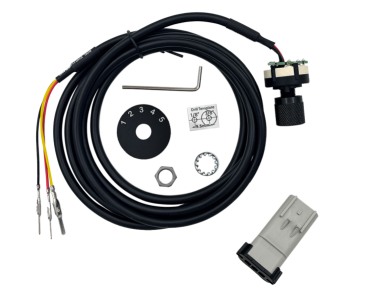
This is the installation process for the ER-0288: 2010+ Dodge Ram Cummins EZ-Lynk/CCV SOTF Switch,provided for your reference during installation.
Step 1:
1.Pull the hood to loosen and open the hood of the truck. Cool the truck down and then proceed to the next step.
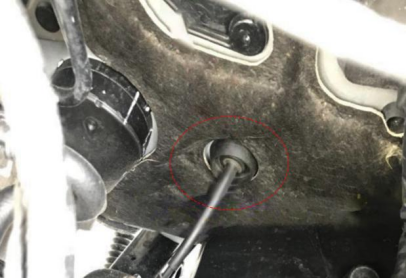
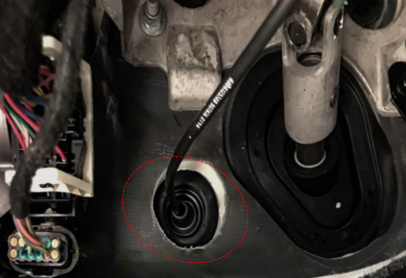
2.Find a rubber ring inside the cab and insert your three wires into the engine compartment. Cut a slit on the rubber ring with a blade, and then pass a 5-foot-long metal wire through the firewall all the way to the interior of the cab. Use electrical tape - tie the red, yellow and black wires to a 5-foot-long metal wire and pass three wires through a rubber ring.
Step 2:
1.As the wires pass through the firewall, leave the switch in the driver's cabin, unwrap the electrical tape on the wires, and remove any residue from the pins. Check the pins to make sure they are not damaged.
2.Pick up the black thread loom and slide it over the red, yellow and black threads. Push the loom all the way into the cab. Use electrical tape to stick the loom onto the red, white and black threads. Leave 8 to 10 inches of wire.
Step 3:
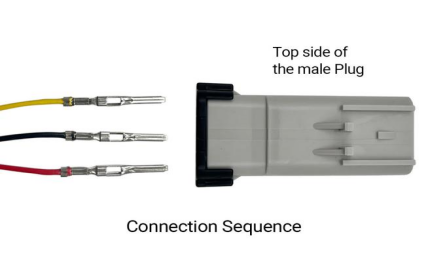
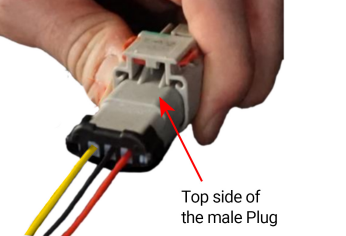
1.After the red, yellow and black wires pass through the firewall, remove the provided male plugs and push the wires into the correct positions as shown below. Place the male plug in front of you and make sure you can distinguish the top from the bottom.
2.Now, hold the top of the male plug with one hand and the wire with the other, and insert the wire from left to right as shown below. When installed correctly, the wires will be locked in place.
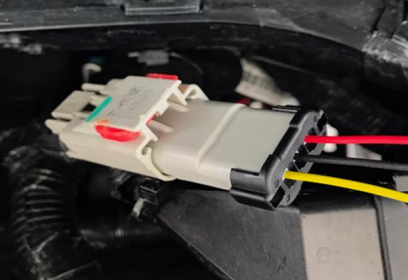
Yellow wire - left terminal , Black wire - middle terminal , Red wire - right terminal.
 Step 4:
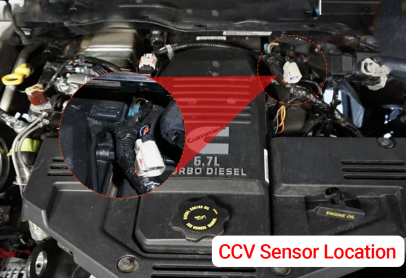
Locate the CCV sensor (crankcase vent) behind the valve cover near the firewall. Disconnect the CCV sensor - Slide the red lock label back, press the back of the gray sensor, and slide the gray sensor towards the driver's side.
 Step 5:
1.Connect the "male plug" of the EZ LYNK switch to the grey CCV sensor and slide the red lock label back to the lock position. Carefully zip up all the extra wires/looms to avoid contact with any moving parts.
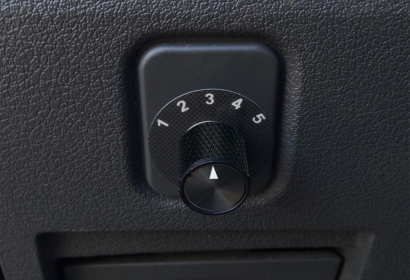
2.Install your SOTF-tuned SOTF switch on your smartphone or tablet using the EZ link app.
This high-performance component does not comply with the laws and regulations for highway driving and cannot be used on any vehicle that has been registered or certified for use on highways. This means that the component may only be suitable for racing cars or other off-road vehicles. If it is installed on vehicles driving on the highway, legal issues will be borne by oneself.
This is the installation process for the ER-0288: 2010+ Dodge Ram Cummins EZ-Lynk/CCV SOTF Switch,provided for your reference during installation.
Step 1:
1.Pull the hood to loosen and open the hood of the truck. Cool the truck down and then proceed to the next step.
2.Find a rubber ring inside the cab and insert your three wires into the engine compartment. Cut a slit on the rubber ring with a blade, and then pass a 5-foot-long metal wire through the firewall all the way to the interior of the cab. Use electrical tape - tie the red, yellow and black wires to a 5-foot-long metal wire and pass three wires through a rubber ring.
Step 2:
1.As the wires pass through the firewall, leave the switch in the driver's cabin, unwrap the electrical tape on the wires, and remove any residue from the pins. Check the pins to make sure they are not damaged.
2.Pick up the black thread loom and slide it over the red, yellow and black threads. Push the loom all the way into the cab. Use electrical tape to stick the loom onto the red, white and black threads. Leave 8 to 10 inches of wire.
Step 3:
1.After the red, yellow and black wires pass through the firewall, remove the provided male plugs and push the wires into the correct positions as shown below. Place the male plug in front of you and make sure you can distinguish the top from the bottom.
2.Now, hold the top of the male plug with one hand and the wire with the other, and insert the wire from left to right as shown below. When installed correctly, the wires will be locked in place.
Yellow wire - left terminal , Black wire - middle terminal , Red wire - right terminal.
Locate the CCV sensor (crankcase vent) behind the valve cover near the firewall. Disconnect the CCV sensor - Slide the red lock label back, press the back of the gray sensor, and slide the gray sensor towards the driver's side.
1.Connect the "male plug" of the EZ LYNK switch to the grey CCV sensor and slide the red lock label back to the lock position. Carefully zip up all the extra wires/looms to avoid contact with any moving parts.
2.Install your SOTF-tuned SOTF switch on your smartphone or tablet using the EZ link app.
Last edited:
